
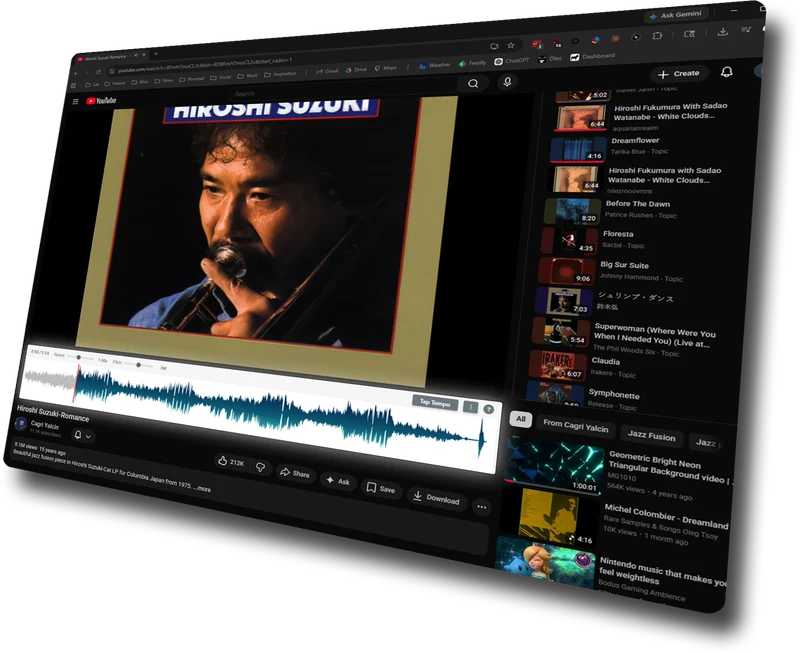
Dig Smarter, Sample Faster

A Chrome extension that renders waveforms beneath YouTube and Samplette videos with precise playback and interactive controls for finding samples for beats faster.
Free trial, no credit card required
GrooveScope waveform overlay on YouTube
THE WAVEFORM, IN YOUR HANDS

Interactive Demo

Watch, listen, and explore the waveform of this track.

FEATURES

Why Producers Love GrooveScope

Built to help producers actually find samples

Visual Waveforms

See the entire track's audio waveform overlaid on any YouTube video. Fully interactive – click anywhere to jump instantly.

On-The-Fly Looping

No more blind scrubbing – quickly identify and jump to drops, breaks, instrumental sections, and more.

Plug and Play

One-click install. Works seamlessly with YouTube and Samplette with full customization of look and feel.

Playback Speed

Slow down or speed up playback to catch every detail. Fine-tune the tempo to match your workflow.

Pitch Control

Adjust pitch independently from speed to preview how a sample sounds in your project. Match keys in the browser.

Tap for Tempo

Tap along to any track to instantly detect the BPM. Know the tempo before you sample so you can match your project grid.
HOW IT WORKS

How GrooveScope Works

GrooveScope adds a waveform and sampling controls right under the video player. No DAW or extra software needed to audition a sample.
  1. Add GrooveScope to Chrome

    Install it from the Chrome Web Store. It also runs in Chromium-based browsers like Edge, Brave, and Arc.
  2. Open a YouTube or Samplette video

    GrooveScope draws the full track's waveform below the player, so drops, breaks, and quiet intros are visible before you hear them.
  3. Click, loop, and adjust

    Click the waveform to jump anywhere, tap or drag to loop a section, slow it down to 0.25x, or shift the pitch up to 12 semitones either way without changing the speed.
GrooveScope at a glance
What it isA Chrome extension that adds an interactive audio waveform below YouTube and Samplette videos
Built forBeatmakers, producers, DJs, and crate diggers
Works onYouTube and Samplette
BrowsersGoogle Chrome and Chromium-based browsers (Edge, Brave, Arc)
Playback speed0.25x to 2x, in 0.05x steps
Pitch shift−12 to +12 semitones, independent of speed
LoopingTap to Loop, or drag to select a loop region
TempoTap along with Tap Tempo to get the BPM
PriceFree trial with no credit card, then $0.99/month or $10/year
TESTIMONIALS

What Producers Are Saying

Real feedback from beatmakers and DJs using GrooveScope every day
hooligan chase
Rapper and Producer
225,000+ monthly listeners on Spotify
"GrooveScope helps me find samples and make loops about ten times faster than just scrubbing through YouTube videos manually."
Kalibvr
Producer and DJ
500,000+ plays on SoundCloud
"GrooveScope completely changed my workflow. I used to spend hours scrubbing through YouTube videos to find the right sample, but now I can see the waveform instantly and zero in on the exact moment I need. It's like crate-digging with X-ray vision."
PRICING

Simple Pricing

One plan. Every feature. Try it free, then pick a cadence that fits.
Free Trial
$0to start
No credit card required.
  • ✓ Every GrooveScope feature, unlocked
  • ✓ Works on YouTube & Samplette
  • ✓ Sign up with just your email
  • ✓ Pick monthly or yearly when you're ready
Start Free Trial
Monthly
$0.99/month
Billed monthly. Cancel anytime.
  • ✓ All GrooveScope features — waveforms, looping, speed & pitch
  • ✓ Works on YouTube & Samplette
  • ✓ Keep your settings & saved samples
  • ✓ Cancel anytime, right from your account
Start Monthly
Every plan includes every feature. Start with the free trial and upgrade only if GrooveScope earns it.
Ready to
Sample Smarter?
Join thousands of DJs and producers who are finding samples and making beats faster with GrooveScope.
Add to Chrome

Frequently Asked Questions


What is GrooveScope?

GrooveScope is a Chrome extension built for DJs, producers, and beatmakers. It renders interactive audio waveforms beneath YouTube and Samplette videos, giving you precise playback controls to find and sample music faster.

How do I find samples on YouTube faster?

Install GrooveScope and open the video. The waveform under the player shows loud sections, breakdowns, and quiet intros at a glance, so you can click straight to the part you want, loop it, and change the speed or pitch to hear how it fits your project.

Which browsers does GrooveScope support?

GrooveScope is currently available as a Chrome extension. It works on Google Chrome and any Chromium-based browser (Edge, Brave, Arc, etc.).

Does GrooveScope work on Firefox or Safari?

Not currently. GrooveScope runs on Google Chrome and Chromium-based browsers such as Edge, Brave, and Arc.

Which websites does it work on?

GrooveScope currently supports YouTube and Samplette. We're actively working on expanding to more platforms.

Is GrooveScope free?

GrooveScope offers a free trial so you can try all features before committing, and no credit card is needed to start it. After the trial, GrooveScope costs $0.99 per month or $10 per year. Both plans include every feature, and you can cancel anytime from your account.

How far can I change the speed and pitch?

Playback speed goes from 0.25x to 2x in 0.05x steps. Pitch shifts from 12 semitones down to 12 semitones up, independent of speed, so you can slow a track down or move it into your project's key without the other changing.

Does GrooveScope collect my browsing data?

GrooveScope does not collect your browsing history. The website demo plays a fixed video through YouTube's embedded player and draws its waveform from audio hosted on this site; no video ID is sent to an audio provider. We do not build a viewing-history profile. See our Privacy Policy for details.

How do I get support or report a bug?

Reach out to us at admin@groovescope.com. We'd love to hear your feedback, feature requests, or bug reports.
